Humburger Font: Elevating Web Design with Playful Elegance
As a web designer, typography is one of the most powerful tools in shaping user experience, brand perception, and conversion potential. Humburger, a whimsical script font with a relaxed theme, offers a unique blend of personality and practicality that makes it a standout addition to any digital project. Whether you're crafting a boutique website, a landing page for a new course, or a branded Shopify store, Humburger brings a touch of warmth and approachability without sacrificing readability.
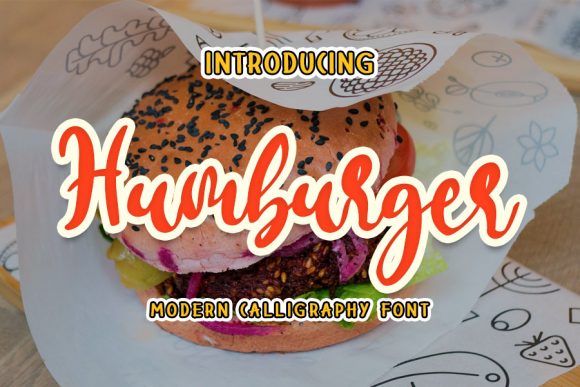
Visually, Humburger is a modern script font that mimics natural handwriting, with soft curves and an organic flow. It carries a sense of spontaneity while maintaining a clean, legible structure—perfect for web use where clarity and charm must coexist. Unlike overly ornate script fonts that can feel cluttered on screen, Humburger strikes a balance between decorative flair and digital usability, making it ideal for both desktop and mobile interfaces.
Where to Use Humburger in Web Design
Humburger shines in areas where a human touch is needed to break up the grid and inject brand personality. It’s particularly effective in hero headers, call-to-action buttons, and logo text. For example, a coaching website might use Humburger for the main headline over a soft background image, instantly conveying warmth and trust. Similarly, a creative portfolio site could feature Humburger in section titles to highlight the designer’s unique voice and aesthetic.
When designing an online store, Humburger works well in promotional banners, product tags, and featured content sections. Its relaxed vibe complements lifestyle and wellness brands, handmade product shops, or boutique services. For landing pages, it’s a strong choice for subheadings and short-form text that needs to stand out without overwhelming the user. Humburger also pairs beautifully with minimalist sans serif fonts, creating a visual rhythm that guides the eye through the page.
Readability and Responsive Design Considerations
Despite its decorative nature, Humburger maintains strong legibility at medium to large sizes, making it best suited for headlines, buttons, and short phrases rather than body copy. On mobile screens, it’s essential to use it at a readable size—typically above 18px for titles and 14px for subtitles. Avoid using it on dark backgrounds without sufficient contrast, as the fine strokes can get lost. When overlaying Humburger text on images, consider adding a subtle background overlay or using letter spacing to enhance clarity.
For responsive layouts, test Humburger across different devices and screen resolutions. It performs best when used sparingly, ensuring it doesn’t slow down page load times or cause layout shifts. Since it’s a script font, avoid using it in long paragraphs or dense content blocks. Instead, reserve it for moments where a touch of elegance or playfulness enhances the brand message.
Font Pairing Strategies for Digital Projects
One of the strengths of Humburger is how well it pairs with other typefaces. For a modern, clean look, combine it with a neutral sans serif like Montserrat, Lato, or Open Sans for body text and navigation elements. This contrast creates a strong visual hierarchy and keeps the layout from feeling too whimsical or informal. If you're designing a more editorial or luxury-focused site, pairing Humburger with a refined serif font like Playfair Display or Cinzel adds a touch of sophistication.
In brand kits or multi-page websites, using Humburger as a highlight font across headers, logo treatments, and social media graphics helps maintain a consistent identity. This approach reinforces brand recognition while allowing flexibility in supporting typography. For example, a digital course sales page might use Humburger for the course title and instructor name, with a clean sans serif for the benefits list and call-to-action buttons.
Practical Tips for Using Humburger in Digital Products
When integrating Humburger into a web or app project, always check the available file formats and styles. Most premium script fonts like Humburger come with web-optimized formats such as WOFF and WOFF2, ensuring fast loading and broad browser support. Look for alternates and ligatures that can add variety to headlines and prevent repetition. Some versions may include multiple weights or stylistic sets that allow for customization in logo design or print materials.
For client work or commercial projects, verify the licensing terms of the font. Many script fonts, including Humburger, are available under commercial licenses that permit use in websites, online stores, landing pages, and digital templates. Always ensure the license covers the intended use, especially if distributing the font as part of a downloadable brand kit or theme.
Real-World Applications of Humburger
Consider a personal branding website for a lifestyle blogger. Humburger could be used in the hero section as the main headline, paired with a simple sans serif for the byline and navigation. On a product landing page for a wellness app, Humburger might appear in the feature highlights or testimonials section, adding a personal touch to user quotes.
In a Shopify store selling handmade candles, Humburger could be featured in the homepage banner, category headers, and product tags. For a digital course platform, it’s ideal for the course title and instructor bios, helping to create a warm, inviting atmosphere. Even in portfolio sites or agency landing pages, Humburger adds a sense of creativity and craftsmanship without feeling overly casual.
Final Thoughts on Humburger in Digital Design
Humburger is more than just a pretty script font—it’s a versatile tool for web designers and digital creators who want to blend personality with purpose. Its relaxed elegance makes it ideal for brands that value approachability, creativity, and authenticity. Whether you're designing a landing page, a Shopify store, or a digital brand kit, Humburger offers the right balance of style and usability to elevate your typography and support your visual storytelling goals.